Joining a session?
ROOM FOR EVERY VOICE

Your questions.
Ideas come alive.

Make everyone’s contribution visible with live polls, quizzes, forms and word clouds.

EXAMPLE DEMO · NOT A LIVE SESSION

Describe working together in one word

Word cloud: frequent responses appear larger and darker.together · 3 responsestogetherideas · 2 responsesideasdiscovery · 1 responsesdiscoverycuriosity · 1 responsescuriositylearning · 1 responseslearningtrust · 1 responsestrust
etkiva.

Describe working together in one word

Up to 3 short phrases; at most 40 characters per phrase. Example: ideas, curiosity, trust.

How do I use this demo?
  1. Choose a question type from the tabs above. The results area shows aggregate responses, and the example phone has a response field.
  2. Enter up to 3 short phrases separated by commas in the phone: ideas, curiosity, trust. Press Try a response.
  3. Watch repeated phrases grow and become darker. Use Word view and Bubble view to inspect the same responses in two appearances.
  4. Use Reset demo to restore the example responses. Use Create your own event to prepare a separate event in your account.

This demo uses illustrative responses; entries here are not saved to your real event.

Open the step-by-step guide →
Create your own event
No participant accounts16 question and content typesTurkish and EnglishCurrently free access
WHAT ARE YOU PREPARING TODAY?

Choose a goal. Find your flow.

Adapt every question to your topic.

Explore prior knowledge and expectations.

Times are facilitation estimates based on question types; audience size and discussion affect duration.
FROM AN IDEA TO A PRESENTATION

Prepare. Preview. Start together.

Your slides, live preview and settings in one workspace. Check the participant experience with the phone preview.
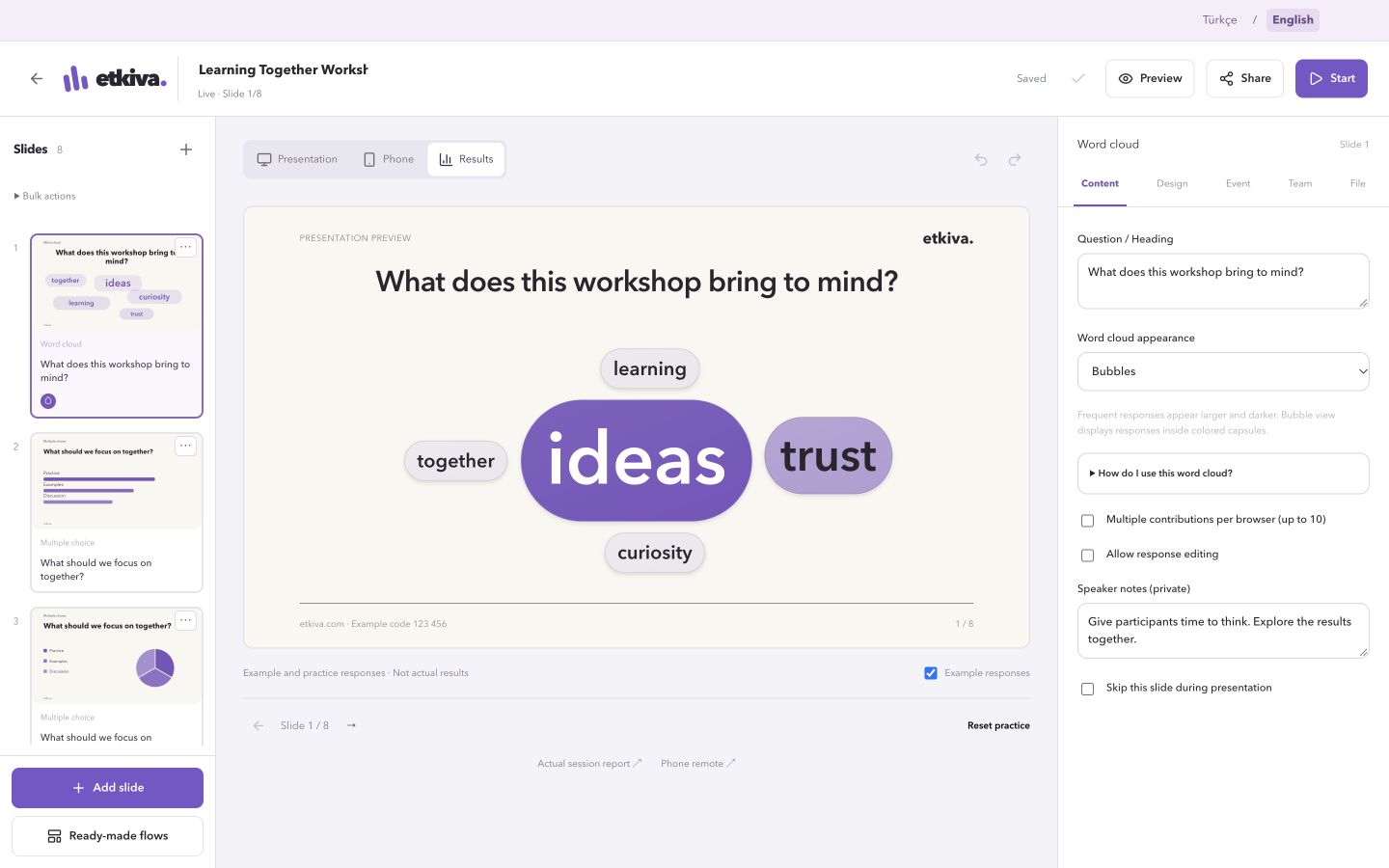
Prepare your presentation
Etkiva presentation editor: slides on the left, results preview in the middle, question and design settings on the right
Screenshot of the actual Etkiva interface, using a sample presentation.
Drag to reorder slidesReady-made flows in Turkish and EnglishPractice separate from actual data
FROM A QUESTION TO SHARED IDEAS

Three steps. More participation.

Step-by-step help

Prepare your poll, quiz or form. Start with a template and add your own questions.

Create an event
SLIDES1 ✦2 ✦3 ✦
ETKIVA LIVE

The next big idea?

ONE ACCOUNT. THREE WAYS TO ENGAGE.

In the moment. At your own pace.
Over time.

Compare the product family
WHEREVER YOU COME TOGETHER

Make room for
everyone.

Hear more than a few voices in a meeting. Discover quiet ideas, shared priorities and questions.

Explore use cases

Illustrative team workshop with participants using phones
Illustrative scenario created for Etkiva.
THE EDUCATOR TOOLKIT

A ready-made start for your next class

Lesson starters, exit tickets and workshop feedback: usable questions, practical guides and downloadable packs.

Explore free resources
A SIMPLE START

Start with a ready-made flow

All templates

Choose a way to ask your first question

Start with a question

Ask what you are curious about and choose your own prompt and design.

Pick a ready-made flow

Original, editable templates for meetings and learning reflections.

Explore first

See how to create, share and review responses.

IF YOU HAVE QUESTIONS

Frequently asked questions

Visit help center
Do participants need an account?+

No. They can join in a browser using a code, QR or event link. Hosts need an Etkiva account.

Is Etkiva currently free?+

Yes. Signup and current features are free. Paid subscriptions and payment collection are disabled. See Free access for technical limits.

Can I use Turkish and English?+

Yes. Switch the site language using Turkish / English at the top. Write event questions in the language you prefer.

Can I share results?+

Control result visibility during a presentation and export summaries and data files. Public report sharing is a separate setting.

ETKIVA

Ask a question.
Think together.

Choose a ready-made flow or start with a question of your own.